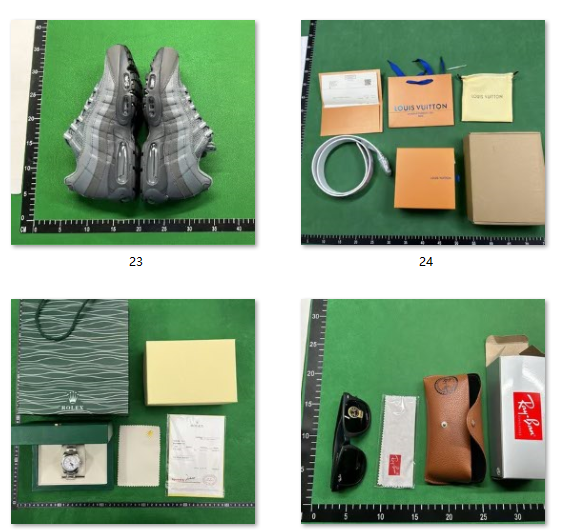
Picking the right seller from a great Oopbuy spreadsheet gets you 80% of the way to a good order. The remaining 20% is QC — and the fastest way to nail QC is using the official Oopbuy QC finder. This complete guide explains exactly how the tool works, how to combine it with your tracking, and how to spot batch defects that most beginners miss.
—
What is the Oopbuy QC finder?
The Oopbuy QC finder is an advanced search tool that pulls up every past buyer’s warehouse inspection photos for the exact same SKU you are about to buy. Instead of guessing whether one set of QC photos is representative, you can use the Oopbuy QC finder to compare yours against dozens of historic ones in seconds to confirm production batches.
By utilizing this tool, you remove the guesswork from international shopping. You no longer have to rely solely on the seller’s stock photos, which are often heavily edited or taken under unrealistic studio lighting. Instead, you get a raw, unfiltered look at what the product actually looks like when it arrives at the agent’s sorting facility.
—
The right workflow: spreadsheet → order → QC finder
To build a flawless haul, you must synchronize your shopping sheets with live warehouse inspection updates. Follow this strict step-by-step workflow:
1. Pick the seller** from the curated [Oopbuy spreadsheet]
2. Place the order** on Oopbuy with the spreadsheet’s recommended size and colour.
3. Wait for QC photos** when the item lands in the warehouse.
4. Search the Oopbuy QC finder** for the same product SKU and compare your photos against the historic set.
5. Approve, reject or request more photos** based on the comparison.
—
How to Tell Replica Batches Apart Using QC Photos
When you open the Oopbuy QC finder, you will often see identical items with slight variations in stitching, leather texture, or overall shape. This happens because different factories produce different “batches” of the same item.
To spot high-tier batches versus budget batches, look closely at the background of the warehouse photos. High-tier factory products usually feature crisp alignment on complex patterns, consistent weight distributed across materials, and minimal glue residue around the midsoles. Budget batches, while cheaper, frequently show asymmetrical panels and sloppy stitching details under close inspection.
—
What to look for in QC photos
👟 Shoes Analysis
Toebox Shape Symmetry:** Check the front-facing profile to ensure one shoe isn’t significantly wider or flatter than the other.
Stitching Density and Spacing:** Count the stitches along key brand elements or panels; uneven spacing is a classic giveaway of a rushed factory run.
Midsole Foam Consistency:** Ensure there are no visible glue stains or structural bubbles bleeding into the upper material.
Insole Text Font and Alignment:** Double-check the internal branding prints, as budget factories often use the wrong font weights.
👜 Bags Analysis
Leather Grain Texture:** Match the natural pebble or smooth grain patterns against retail reference materials to confirm authenticity.
Hardware Embossing:** Ensure all metal logos, zippers, and clasps feature deep, crisp engraving rather than shallow stamping.
Monogram Pattern Alignment:** Pay close attention to how repetitive patterns meet at the structural seams; they should line up perfectly.
—
What to Do If Your Item Fails the QC Inspection?
If you discover a major defect while using the Oopbuy QC finder, do not panic. You have options before the item gets packed into an international parcel. You can immediately open a support ticket within your dashboard and request an exchange (RL – Red Light) or a full refund.
Keep in mind that most domestic sellers offer a standard 7-day return window starting from the day the item arrives at the warehouse. This is why checking your warehouse inspection photos on the very same day they are uploaded is vital for a smooth refund process.
—
Optimize Your Complete Journey
Before you finalize your inspection workflow, make sure your parcel forwarding plans are set up correctly. Once you approved all your items via the Oopbuy QC finder, read our ultimate [Oopbuy Shipping Guide]to safely declare and ship your haul without customs risks.
—
Ready to build your haul?
Open the curated Oopbuy sheet to add items to your warehouse, then [register your account]to unlock shipping coupons for your first parcel.